Filling out the full listing form: title, price, location, rooms, description, uploading each photo one by one, takes time, especially when agents are out in the field. This new feature allows agents to prepare draft listings by simply sending a few photos and a text message to our official Telegram bot — no need to open the portal in the middle of a property visit.
Bagaimana Ia Berfungsi
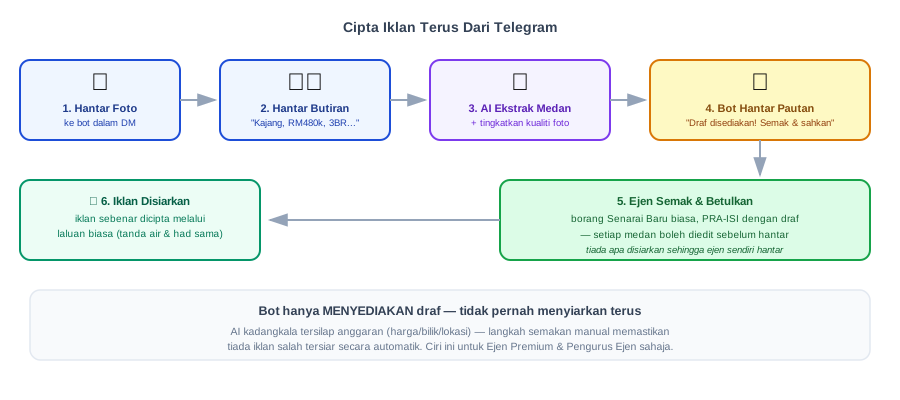
| Step | What you do | What happens behind the scenes |
|---|---|---|
| 1. Send photos | Send several property photos in a private chat with the bot | Each photo is uploaded, its quality is automatically enhanced (brightness & sharpness) |
| 2. Send details | Type a message: e.g. “Kajang, RM480k, 950 kps, 3 bedrooms 2 bathrooms, fully furnished” | AI (our internal language model) analyses the text |
| 3. AI prepares draft | No action required — wait for the bot’s response | Title, price, type, location, bedrooms, size & description are extracted into a draft |
| 4. Receive link | The bot replies: “Draft is ready! View & confirm” with a link | The draft is temporarily saved — it is not yet a real listing |
| 5. Review & correct | Click the link, the regular New Listing form opens pre-filled with the draft | Photos are also automatically uploaded into the form as actual files |
| 6. Submit | Correct any incorrect fields, then submit as usual | A real listing is created through the regular process (watermark, same photo/word limits) |
Why a Draft, Not Directly Published?
AI sometimes makes mistakes, maybe the price is misread, or the number of bedrooms is not clearly mentioned in your message. Therefore, the generated draft is never automatically published. You always review and correct each field on the regular form before submitting, the draft is just a time-saving starting point, not a ready-to-go listing.
Tips for the Best Results
| Do | Avoid |
|---|---|
| Mention the price, location & number of rooms clearly | Too brief messages like “beautiful house, reasonable price” |
| Send all photos first, then one text message | Mixing photos and text alternately in multiple messages |
| Check every field on the form before sending | Send directly without checking — the draft is just an AI estimate |
Conclusion
This feature is designed for agents who are often out in the field, send photos right after a property visit, type a quick summary, and the listing form is already waiting for review when you return to the office or home.