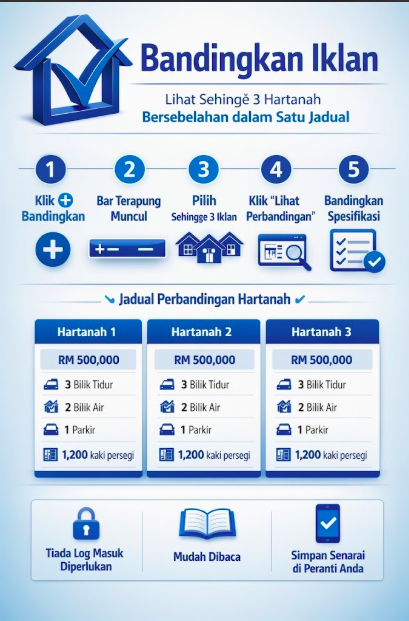
Membeli atau menyewa hartanah biasanya bermakna membuka beberapa tab pelayar sekaligus, satu iklan, tab baharu, iklan kedua, tab baharu lagi, sambil cuba mengingati mana satu ada 3 bilik tidur dan mana satu lebih dekat dengan LRT. Ciri baharu Compare Listings menghapuskan kerja itu: pilih sehingga 3 iklan, dan lihat semua spesifikasi penting bersebelahan dalam satu jadual.
Bagaimana Ia Berfungsi
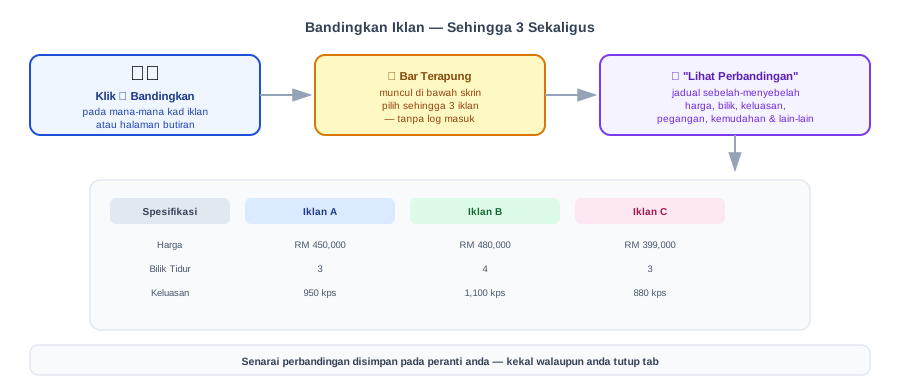
| Langkah | Apa yang berlaku |
|---|---|
| 1. Klik ➕ Bandingkan | Pada mana-mana kad iklan (halaman utama, Cari Hartanah) atau halaman butiran iklan |
| 2. Floating bar appears | At the bottom of the screen, showing the number of selected listings (maximum 3) |
| 3. Select another listing (optional) | Repeat step 1 on another listing, try to add the 4th listing and the system will notify that the limit has been reached |
| 4. Click “View Comparison” | On the floating bar, to open the full comparison table |
| 5. Check the table | Price, bedrooms, bathrooms, area, land area, car parking, year completed, tenure, lot status, type of ownership & facilities, all in one view |
What is Compared?
The comparison table displays fields that are already available on the detail page of each listing — no new information is created, only rearranged to make it easier to compare:
- Price & front photo of each listing
- Bedrooms, bathrooms & parking space
- Building area (square feet) & land area (if applicable)
- Year completed, tenure (freehold/leasehold) & lot status (Bumiputera/Non-Bumiputera)
- Type of ownership & facilities are listed with a ✓ for each listing that has them
No Login Required
Your comparison list is saved directly on the device you're using (not on your account), just like the existing Favourites feature for unregistered visitors. This means potential buyers/tenants can start comparing immediately without needing to register first, and the list remains even if you close and reopen the browser on the same device.
Conclusion
Compare Listings isn't a big feature, but it saves real time at the most important stage: when you're trying to make a decision between a few actual options. Try it now at Find Property — click ➕ Compare on any two or three listings that interest you.