Imagine you want to sell or buy a house, but you're unsure of a reasonable price. Most people do "research" by looking at one or two similar listings on property portals, then just guess the price. The problem is, the listings you see have an ASKING price, not the actual price paid, and they may be outdated for months. Our Property Valuation Estimator (AVM) does this job in a much more scientific way, using real estate transaction data stored in our own database.
What this AVM calculator actually measures
AVM (Automated Valuation Model) is not a regular calculator where you fill in your own formula. It is a data-based valuation tool that automatically searches through real estate transaction data that has ever occurred, matched with state, city, type of property, and size of unit you want to value (within roughly +/- 30% of the floor area of the target unit). From these matches (called "comparables" or "banding"), the system calculates an estimated value based on the actual prices paid by others for similar properties in the same area.
This is important because property value is not a fixed number, it changes according to current market demand, specific location, and time. By relying on actual transactions and not asking prices, AVM provides an estimate that is closer to what the market is actually willing to pay, rather than just the seller's hope.
How the actual formula behind this AVM works
There are three important parts to how our AVM works:
- Comparable searches: The system searches for past transactions that are similar in terms of state, town, type of property, and floor area (approximately plus or minus 30% of the target unit size), arranged from the most recent to the oldest.
- Weighting according to recency: Each comparable transaction has its own price per square foot (psf), but not all transactions are given the same weight. The system uses a smooth "half-life" method, where the weight of a transaction decreases by about half every 180 days. This means that transactions from last month are considered far more important than those from two years ago, as they reflect more up-to-date market conditions. It's not a hard cutoff like "only use data from six months ago," but a gradual and fair decline.
- Final value calculation: Estimated value = recency-weighted average psf multiplied by the floor area of your target unit.
Along with the estimated selling value, the system also provides a low-high range calculated from the
ACTUAL spread of the comparable psf values found, roughly between the 15th and 85th percentiles. This is not a generic "plus or minus 10%" estimate that is made up, but a range that reflects the actual variation in the data from that area of the market.
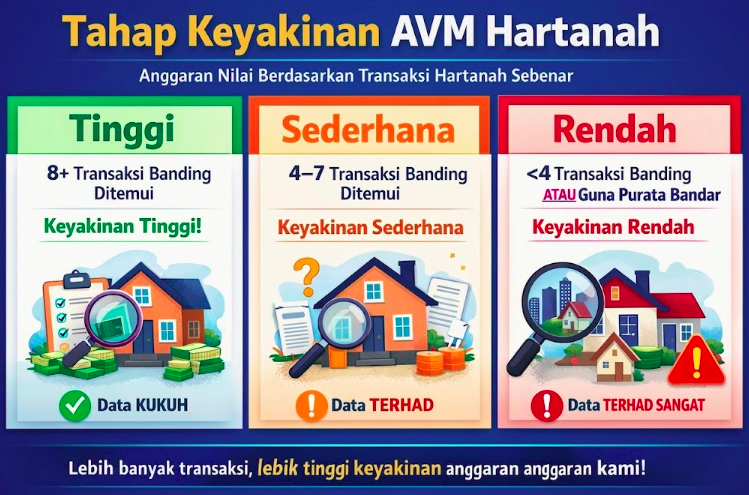
Each estimate is accompanied by a confidence level label: "High" when 8 or more solid comparable matches are found, "Medium" when 4 to 7 comparables are found, and "Low" when fewer than 4 comparables are found, or when the system has to fallback to the average price per city level alone due to insufficient individual transaction data. Being honest about this confidence level is important, as it prevents AVM from appearing confident about accuracy that actually doesn't exist.
As a bonus, this calculator can also estimate the monthly rental value, using a rough rate of about 0.35% of the estimated monthly sale value, since the comparable data used is based on sales, not rentals. This rental estimate is clearly marked as a rule of thumb (a rough estimate), not a detailed rental analysis.
Why is this approach much better than the way many people do "self-estimates" today, which is to look at one or two "similar" listings on property portals and guess the price based on that alone? Because of three main reasons. First, it is based on what REALLY happens (actual transaction prices), not the asking price that sellers can set arbitrarily, which is usually higher than what real buyers are actually willing to pay.
Second, it is relevant to the CURRENT market conditions through the half-life mechanism, so it doesn't "get trapped" by old prices that are no longer relevant to today's market conditions. Third, and perhaps most importantly, it is HONEST about its own confidence level through the "High", "Medium", or "Low" labels, as opposed to a single number that appears certain but is actually based on a very small sample.
Example: finding the value of a 1,000 square foot condominium unit
Say you have a condominium unit measuring 1,000 square feet in a mature area in Petaling Jaya. When you enter the state, town, property type, and unit size into the calculator, the system searches for all condominium transactions within the range of 700 to 1,300 square feet (i.e., plus or minus 30%) in that area.
Say the system finds 10 matching transactions in the past year. Transactions that occurred last week or last month will be given much higher weight compared to transactions that occurred 10 months ago, due to the half-life method of 180 days. This weighted average psf is multiplied by 1,000 square feet to produce an estimated value (point estimate). The low-high range is calculated from the actual psf spread of those 10 transactions, perhaps from RM450 psf at the lower end to RM520 psf at the upper end, before being multiplied by the unit size. Because the total number of transactions is more than 8, the confidence label displayed is "High".
Compare this with another situation: a terrace house unit in a suburban area that rarely changes hands. If the system only finds 2 or 3 matching transactions, or none at all, it will fall back to the city-level average psf as a substitute for individual transaction data. In this case, the confidence label displayed is "Low", and the low-high range provided will be much wider, because the system is being honest that it is less confident in the estimate compared to areas with more transaction data.
Practical tips and common mistakes
- Don't rely on just one listing. The biggest advantage of AVM over "looking at one house on a portal" is that it's an average of MANY real transactions, not just one price offer which may be too high or too low.
- Pay attention to the confidence label. Estimates with a "High" label are more reliable than "Low" estimates. If you get a "Low" label, treat it as a starting point only, not a final figure.
- Range is more meaningful than one number. Focus on the low-high range provided, not just the middle number, especially for major decisions like price negotiations.
- Rental estimates are rough. The rental figure shown (approximately 0.35% of the sale value per month) is a general rule of thumb, it doesn't take into account specific factors like unit fittings or current tenant demand in the area.
- Combine with professional valuations for major decisions. For official transactions like bank loan applications, a certified valuation by a licensed valuer (JPPH or private firm) is still required.
- Understand that the floor area entered must be accurate. Since the basic formula involves psf multiplied by area, small errors in the floor area you enter (for example, miscalculating built-up area versus land area) can result in inaccurate estimates.
- New or less active areas require more patience. New development areas with few past transactions will always have a "Low" confidence label at the early stages, this is not a weakness of the calculator, it reflects the reality that market data is indeed not yet fully formed in those areas.
Try this calculator for free at Property Value Estimation Calculator.
Note: The estimates generated by this calculator are for illustrative and preliminary guidance purposes only, based on transaction data available in our database at the time of search. It is not an official appraisal and should not be used as a substitute for professional financial or legal advice.