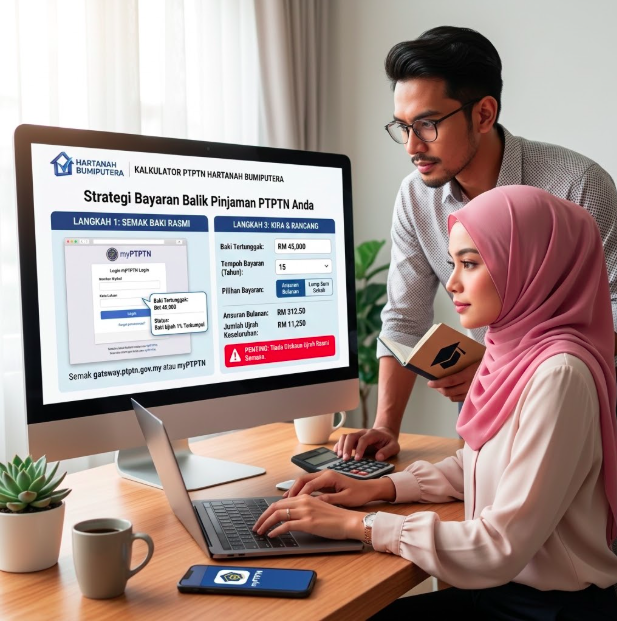
If you have ever received a PTPTN education loan, knowing the exact outstanding balance — and planning repayment wisely — can save you thousands of ringgit in commission (profit charge) throughout the loan period. Below is a guide to check the official balance, and how to use the Hartanah Bumiputera calculator to plan your repayment strategy.
Step 1: Check the Official Balance
PTPTN verification can be done 24 hours a day via the official portal gateway.ptptn.gov.my or the myPTPTN mobile app, using your MyKad number and password. Log in and go to the Loan Statement section to view:
- Outstanding loan balance, including the accumulated 1% commission
- Current repayment schedule
- Blacklist status, important: outstanding balances exceeding RM2,000 may affect the approval of your passport for international travel (Exit Restriction Order)
The myPTPTN app also offers quick verification via biometric scanning (face/fingerprint) without needing to type your password each time.
Step 2: Understand the Commission Structure
PTPTN charges a commission (Shariah-compliant profit charge, a substitute for conventional interest) at a rate of 1% per year, calculated on the original loan amount, not the reduced balance. This means extending the repayment period DOES NOT reduce the total commission amount; instead, it increases because the 1% commission is applied every year throughout the loan period.
Step 3: Calculate Repayment With the Calculator
Use the PTPTN Repayment & Structuring Calculator on Hartanah Bumiputera to:
- Enter your outstanding balance and selected repayment period to view monthly installments and total commission
- Simulate the effect of a one-time lump-sum payment on the remaining balance and period
- Compare scenarios with shorter terms (higher installments, lower total commission) versus longer terms (lower installments, higher total commission)
Important Note: No Official Commission Discounts Currently
The official PTPTN account (@ptptnofficial) has repeatedly denied any unofficial discounts/exemptions of commission — be cautious of any unofficial messages/announcements claiming otherwise. Our calculator DOES NOT assume any commission discounts unless you enter them yourself based on official PTPTN announcements.
Source: Official PTPTN Portal (ptptn.gov.my/e-perkhidmatan-bayaran-balik). Please verify your actual balance and account status directly through the official PTPTN portal/app, this calculator is for planning purposes only.